1. Board orientation
What colour should the bottom-right corner square be from your side?
Correct answer: light. The memory rule is light square on the right. Open Check Orientation below to see it.

Learn how to set up a chess board correctly before the first move. The fastest check is simple: the bottom-right square must be light and the queen must sit on her own colour. Use the Interactive Setup Checker below to verify board orientation, pawn rows, queen squares, king squares, the back-rank order, and the full starting position.
The correct chess board setup starts with a light square in the bottom-right corner from each player's side. Then place rooks in the corners, knights next to rooks, bishops next to knights, queens on their own colour, kings on the remaining central square, and pawns on rank 2 for White and rank 7 for Black.
Orientation: the bottom-right corner square is light.
Queen rule: White queen on d1 and Black queen on d8.
King squares: White king e1 and Black king e8.
First move: White always moves first.
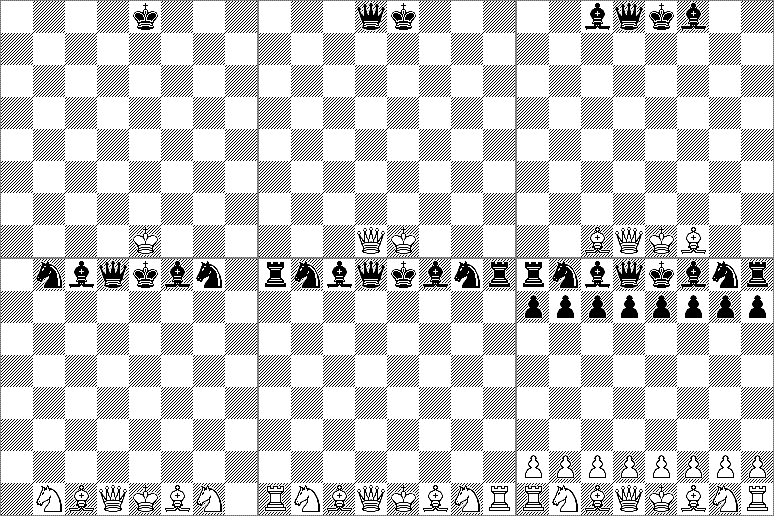
Work through five compact checks. Every answer changes the profile, ratings, warning or exact checker view.
Answer each setup check, then use the Interactive Setup Checker below to see the same idea on the board.
1. Board orientation
What colour should the bottom-right corner square be from your side?
2. Queen placement
Which rule places the queens correctly?
3. White queen square
Where does the White queen start?
4. Black queen square
Where does the Black queen start?
5. Pawn rows
Where do the pawns start in the normal setup?
6. Back-rank order
What is the back-rank order from left to right once the board is oriented correctly?
7. First move
Who moves first after the board is set up correctly?
8. Common mistake
What is wrong if the queens are on e1 and e8 and the kings are on d1 and d8?
This page is written in English, but the correct chess board setup is visual and universal. Some players may arrive here after searching for Indonesian phrases such as tata letak catur, susunan catur yang benar, or posisi papan catur, or the Spanish phrase posición inicial del tablero de ajedrez.
The answer is the same: keep a light square in the bottom-right corner, put the queen on her own colour, place the kings beside the queens, and fill the pawn rows in front. Use the Interactive Setup Checker below to verify the layout visually.
Use the checker in the exact mode you need. You can inspect orientation first, then build the setup from pawns and back-rank pieces, then confirm the queens, kings, and full starting position.
The Interactive Setup Checker changes the board view for each stage so you can confirm one idea at a time rather than memorising the full position all at once.
Follow this order and most beginner mistakes disappear. The key is to orient the board first, place the outer structure next, and leave the queen and king until the centre is clear.
Most setup errors come from two simple problems: the board is facing the wrong way or the king and queen are swapped. The easiest fix is to check orientation first, then verify d1, d8, e1, and e8.
Most common mistake: a dark square ends up on the bottom-right corner, which means the board is turned the wrong way.
Second common mistake: the queen and king get swapped because both pieces begin in the centre.
Fast correction: fix orientation first, then use the queen rule to place d1 and d8 before you place e1 and e8.
Once the board is facing the right way, the back rank becomes much easier to remember from the outside in.
White back rank: rook, knight, bishop, queen, king, bishop, knight, rook.
Black back rank: rook, knight, bishop, queen, king, bishop, knight, rook.
Pawn row: eight pawns stand directly in front of the pieces.
Anchor squares: queens on d1 and d8, kings on e1 and e8.
Files are columns and ranks are rows. This matters because setup questions often come down to square names such as d1, e1, d8, e8, or h1.
The red arrow shows a file and the blue arrow shows a rank.
The correct chess board setup starts with a light square in the bottom-right corner, with rooks in the corners, knights next to rooks, bishops next to knights, queens on their own colour, kings on the remaining central squares, and pawns in front. The standard starting position fixes White on ranks 1 and 2 and Black on ranks 7 and 8. Use the Interactive Setup Checker in Full Setup mode to verify every starting square at once.
You set up a chess board correctly by orienting the board first, then placing pawns, then rooks, knights, bishops, queens, and kings. Most setup errors come from a rotated board or from placing the queen and king before the rest of the back rank is clear. Follow the Step-by-Step Setup Order on this page to place the position in the safest sequence.
You set up a chess board step by step by checking orientation, placing the pawn rows, building the back rank from the corners inward, and then placing the queens and kings. The outside-in pattern keeps the rooks, knights, and bishops in a fixed order and leaves the two centre files easy to solve. Follow the Step-by-Step Setup Order and then switch the Interactive Setup Checker through each stage.
The starting position in chess is the standard arrangement before any move has been played. White occupies ranks 1 and 2, Black occupies ranks 7 and 8, the queens start on d1 and d8, and the kings start on e1 and e8. Use the Interactive Setup Checker in Full Setup mode to compare your board against the exact starting position.
White moves first in chess. That rule is fixed in standard chess and is part of the official starting position rather than a house preference. Use the Fast Checklist on this page to confirm the setup first and then begin with White to move.
There are 32 pieces on the board at the start of a chess game. Each side has 16 pieces made up of 8 pawns, 2 rooks, 2 knights, 2 bishops, 1 queen, and 1 king. Use the Interactive Setup Checker in Full Setup mode to confirm that all 32 pieces are present and on the correct squares.
Each side starts with 8 pawns in chess. The pawns form a complete row in front of the back-rank pieces, with White on rank 2 and Black on rank 7. Use the Interactive Setup Checker in Place Pawns mode to confirm both pawn rows quickly.
A chess board should face so that each player has a light square in the bottom-right corner. That single corner test prevents the most common beginner setup error before a single piece is placed. Use the Interactive Setup Checker in Check Orientation mode to lock in the light-square rule.
Yes, white on the right means the bottom-right corner square from each player's side is a light square. The phrase is a memory rule about square colour and board orientation, not about where White sits around the table. Use the Interactive Setup Checker in Check Orientation mode to verify that bottom-right light square visually.
White on right means the square at the bottom-right corner from your side must be light. It is a shorthand rule that stops the whole board from being rotated the wrong way before setup begins. Use the 2-second check box and then confirm the idea in the Interactive Setup Checker in Check Orientation mode.
The bottom-right corner square should always be light. That rule defines the correct board orientation and keeps the queen squares and notation aligned properly. Use the Interactive Setup Checker in Check Orientation mode to verify the corner square before you place any pieces.
If the chess board is set up the wrong way, the full starting position becomes wrong even if the pieces look tidy. A rotated board usually leads to wrong queen placement and breaks the standard relationship between square colours and coordinates. Use the Interactive Setup Checker in Check Orientation mode first and then return to Full Setup mode to correct the whole position.
Yes, board direction matters because a sideways board changes the square colours at the corners and ruins the normal setup. That orientation error then cascades into queen, king, and notation confusion. Use the Fast Checklist and the Interactive Setup Checker in Check Orientation mode to catch the problem immediately.
Yes, a chess board is set up the same way in the UK as everywhere else in standard chess. The orientation rule, queen placement rule, and White-moves-first rule are international rather than local customs. Use the same light-square-on-the-right test shown in the Interactive Setup Checker wherever you play.
Yes, it matters because each player should sit behind one army with their pieces nearest to them. The orientation test is checked from your own side, so the bottom-right square must be light from where you are sitting. Use the hero position and the Interactive Setup Checker in Check Orientation mode to verify the board from the player's viewpoint.
Yes, the queen goes on her own colour in chess. The White queen starts on d1, which is a light square, and the Black queen starts on d8, which is a dark square. Use the Interactive Setup Checker in Check Queens mode to confirm both queen squares instantly.
The queen goes on her own colour, not the king. Once the queen is fixed on d1 or d8, the king automatically belongs on the remaining centre square beside her. Use the Interactive Setup Checker in Check Queens mode first and then switch to Full Setup mode to confirm the kings.
The White queen starts on d1. That square is light, which matches the rule that the queen starts on her own colour. Use the Interactive Setup Checker in Check Queens mode to highlight d1 before you place the White king on e1.
The Black queen starts on d8. That square is dark, which matches the same queen-on-her-own-colour rule used for White. Use the Interactive Setup Checker in Check Queens mode to highlight d8 before you place the Black king on e8.
Yes, the queens face each other on the same file in the standard starting position. Both queens start on the d-file, which makes queen placement one of the quickest setup checks. Use the Interactive Setup Checker in Check Queens mode to see the queens aligned directly opposite each other.
The White king starts on e1 and the Black king starts on e8. The king always occupies the remaining centre square after the queen has been placed on her own colour. Use the Interactive Setup Checker in Full Setup mode to confirm the king squares alongside d1 and d8.
Beginners mix up the king and queen squares because both pieces begin in the centre and look like a pair to the eye. The reliable anchor is the queen-on-her-own-colour rule, which fixes d1 and d8 first and leaves e1 and e8 for the kings. Use the Interactive Setup Checker in Show Royal Mistake mode and then switch back to Check Queens mode to correct the error.
The pawns go in a full row directly in front of the main pieces. White pawns start on rank 2 and Black pawns start on rank 7, creating the front line for each side. Use the Interactive Setup Checker in Place Pawns mode to confirm both pawn rows before you build the back rank.
The rooks start in the four corner squares. White rooks begin on a1 and h1, and Black rooks begin on a8 and h8, so they anchor the edges of the position. Use the Step-by-Step Setup Order and then check the corner squares again in Full Setup mode.
The knights start next to the rooks. White knights begin on b1 and g1, and Black knights begin on b8 and g8, making them the second pieces in from each side. Use the Interactive Setup Checker in Build Back Rank mode to keep the rook-knight pattern straight.
The bishops start next to the knights. White bishops begin on c1 and f1, and Black bishops begin on c8 and f8, leaving the queen and king for the two centre files. Use the Interactive Setup Checker in Build Back Rank mode to confirm the bishop squares before adding the royal pieces.
The back-rank order is rook, knight, bishop, queen, king, bishop, knight, rook from left to right on each side. That sequence is fixed and mirrored once the board is oriented correctly. Use the Interactive Setup Checker in Build Back Rank mode and then compare it with the Back-Rank Piece Order box.
Yes, both sides have the same piece order in chess setup. The arrangement is symmetrical across the board, although White starts below and Black starts above. Use the Interactive Setup Checker in Full Setup mode to see the same rook-to-rook structure on both sides.
Yes, you can place the pieces in any order as long as the final position is correct. In practice, the safest beginner method is orientation first, pawns next, outer back-rank pieces next, and queens and kings last. Follow the Step-by-Step Setup Order on this page if you want the cleanest build sequence.
A chess board has 64 squares arranged in an 8 by 8 grid. That structure creates 8 files and 8 ranks, which is why named squares such as d1 and e8 are possible. Use the Files and Ranks Demo on this page to connect the grid to real setup squares.
Files are the vertical columns labelled a through h, and ranks are the horizontal rows numbered 1 through 8. That coordinate system is used for every starting square, move, and notation reference in chess. Use the Files and Ranks Demo to see one file and one rank marked directly on the board.
The difference is that files run vertically while ranks run horizontally. Every square name combines one file letter and one rank number, so mixing them up can create setup errors. Use the Files and Ranks Demo to compare the red file arrow and the blue rank arrow side by side.
d1 means the square on file d and rank 1. It is one of the most important beginner setup squares because the White queen starts there in the standard position. Use the Files and Ranks Demo and then return to Check Queens mode in the Interactive Setup Checker to confirm d1.
e1 means the square on file e and rank 1. It matters in setup because the White king starts there once the White queen has been placed on d1. Use the Files and Ranks Demo and then switch the Interactive Setup Checker to Full Setup mode to confirm e1.
The fastest way is to check that the bottom-right square is light and that the queen is on her own colour. Those two tests catch most beginner setup mistakes because orientation and royal-piece placement are the two usual failure points. Use the 2-second check box and then verify both ideas in the Interactive Setup Checker.
The most common mistake is rotating the board the wrong way so a dark square ends up in the bottom-right corner. That one error often causes the queen and king to be placed incorrectly even when the back-rank order looks neat. Use the Fast Checklist first and then re-open Check Orientation mode in the Interactive Setup Checker before touching any pieces.
The safest answer is no, because a standard game should begin from the correct starting position. A wrong setup changes the relation between square colours, piece placement, and notation from move one. Use the Interactive Setup Checker in Full Setup mode to reset the position correctly before you begin.
No, you cannot swap the king and queen in the standard starting position. The queens belong on d1 and d8 and the kings belong on e1 and e8, so swapping them creates a wrong setup immediately. Use the Interactive Setup Checker in Show Royal Mistake mode to spot the error and then return to Full Setup mode to fix it.
The easiest memory method is light square on the right, queen on her own colour, then rook, knight, bishop, queen, king, bishop, knight, rook across the back rank. That gives you one orientation rule, one centre-piece rule, and one pattern instead of many disconnected facts. Use the 2-second check box, the Step-by-Step Setup Order, and the Interactive Setup Checker together until the setup feels automatic.
Players sometimes search for chess board setup in other languages because the answer is visual. Indonesian searches include tata letak catur, susunan catur yang benar, and posisi papan catur. Spanish users may search posición inicial del tablero de ajedrez. The setup rule is the same: light square on the right, queen on her own colour, kings beside queens, and pawns in front. Use the Interactive Setup Checker above to verify the layout visually.
The Complete Beginner's Guide to Chess
Move from board setup into piece movement, check, checkmate and practical opening habits with one guided beginner path.
or create a ChessWorld username
Already have an account? Log in